
 2.1M Ratings
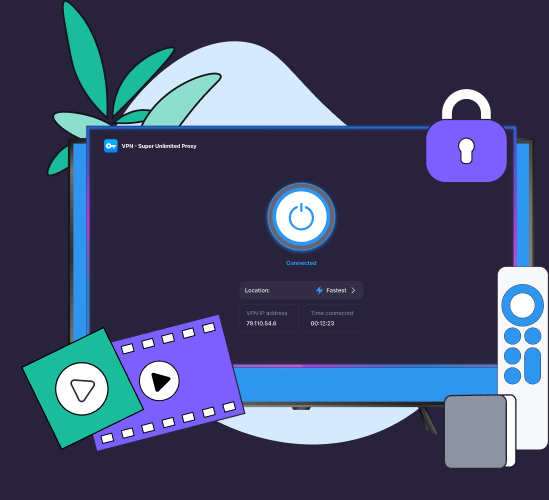
Get more out of your Apple TV with VPN Super. Connect to a VPN server, change your virtual location, and add a simple privacy layer to the shows, films, sports, and apps you already watch—now on the big screen.
 50+ server locations
 Faster priority servers
 VPN on all your devices
VPN Super's Apple TV keeps the experience simple: open the app, pick a server, and get back to watching.

Connect to Premium servers built for smoother 4K streaming and busy Wi-Fi.

Stream your favorite shows from anywhere. We keep our servers tuned for reliable access.

Use one Premium subscription across your Apple TV, phone, laptop, tablet, and more.

VPN Super doesn't track or store your activity, giving you a clearer privacy layer.

Switch locations, reconnect, and get back to watching without ad interruptions.

Your subscription is covered by our 30-day money-back guarantee.
Exclusively for Premium subscribers, the VPN Super app for Apple TV is the easiest way to stream with greater privacy and location flexibility.



If your Apple TV supports VPN apps, setup couldn't be easier.
1. Open the App Store and search for "VPN - Super Unlimited Proxy."
2. Install VPN Super and open the app from the home screen.
3. Sign in with your Premium account.
4. Connect to the location of your choice.
Works on Apple TV with tvOS 17+

Keep the Apple TV setup you love even when you're abroad.
Stay secure on shared Wi-Fi in apartments or hotels.

Appear to be anywhere in over 50+ locations worldwide.

Cover all your family's devices with one Premium subscription.

A VPN encrypts your internet traffic and routes it through a server, helping to hide your online activity, change your IP, and mask your real location.
VPN Super keeps those controls easy:

VPN Super can improve your Apple TV streaming experience in a couple of ways. It encrypts your traffic on shared networks like hotel or holiday rental Wi-Fi, and can reduce ISP throttling that causes buffering on 4K and HDR streams.
That being said, content access depends on each streaming platform's rules, licensing, and region settings, and isn't guaranteed for any specific catalog.
To stream securely, you'll need a Premium subscription with VPN Super, as well as an account or subscription with the streaming services you want to watch your shows on.
If a streaming app does not load as expected, try connecting to another location, restarting the app, checking your account region, or submitting a request to our Support Team.
VPN Super's native Apple TV VPN app supports models running tvOS 17 or newer, so it's compatible with most—if not all—Apple TVs.
| Setup type | Best for | What to know |
|---|---|---|
| Native Apple TV VPN app | Compatible Apple TV models with App Store VPN support | Simplest setup and seamless compatibility; pick a server in 50+ locations and connect instantly |
| Router-level VPN | Older Apple TV models or whole-home coverage | More technical, affects the wider network, and requires router support |
| Smart DNS | Devices that cannot install VPN apps | Useful for some location-routing use cases, but does not provide VPN-style encryption |
One of the best apps you can get if you're trying to access content while travelling internationally or just for security.
This app has consistently allowed me to bypass geo-restrictions to watch content like Netflix, international sports, foreign YouTube channels that I can't access in my region.
VPN Super joins a growing number of VPN providers offering dedicated smart TV applications, giving users a simpler way to secure their streaming activity directly from their living room devices.
[The] TV app offers streaming-optimized servers built for smoother 4K playback, more than 50 server locations, and coverage for up to 10 devices on a single Premium subscription.
The connection is fast and stable, and it's very easy to use, even for beginners.
VPNs that offer native Apple TV apps in the App Store can mostly work with tvOS 17 and newer. Before choosing a VPN, check the App Store listing for Apple TV support and minimum tvOS version. VPN Super's native Apple TV app is compatible with Apple TVs running tvOS 17 or newer, so you're covered as long as you have a Premium subscription from VPN Super.
Open the VPN app, sign in, choose a VPN server, and select "Connect". When the app shows Connected, return to your streaming app and watch as usual. To change location, return to the VPN app, choose another server, and reconnect. For detailed instructions, check out our guide to installing VPN Super on your Apple TV.
A VPN may help if throttling is based on identifying certain traffic types, but it cannot fix every speed issue. Wi-Fi signal, server distance, home network congestion, device performance, and the streaming service itself can all affect video quality.
A VPN can improve privacy by encrypting supported traffic and changing the IP address visible to some services. It does not make you completely anonymous, neither does it block every tracker or replace privacy settings within individual streaming apps.
VPN Super helps you get more out of your Apple TV, adding a simple privacy layer, more location flexibility, faster priority servers, and coverage for up to 10 devices. Set it up in minutes, press "Connect", and get back to the action.


.webp)